Trello vs Monday.com: Which Project Management Tool Is Right for Your Team?
A no-fluff breakdown for small teams, ops managers, and growing businesses who need to pick one and move on.
Best for small teams, solo operators, and straightforward projects where Kanban is enough. Unbeatable free plan. No seat minimums. Setup in under 10 minutes.
✓ Best Free PlanBest for growing teams that need Gantt charts, workload views, automations, and cross-department visibility. More powerful at scale, but comes with a 3-seat minimum and higher cost.
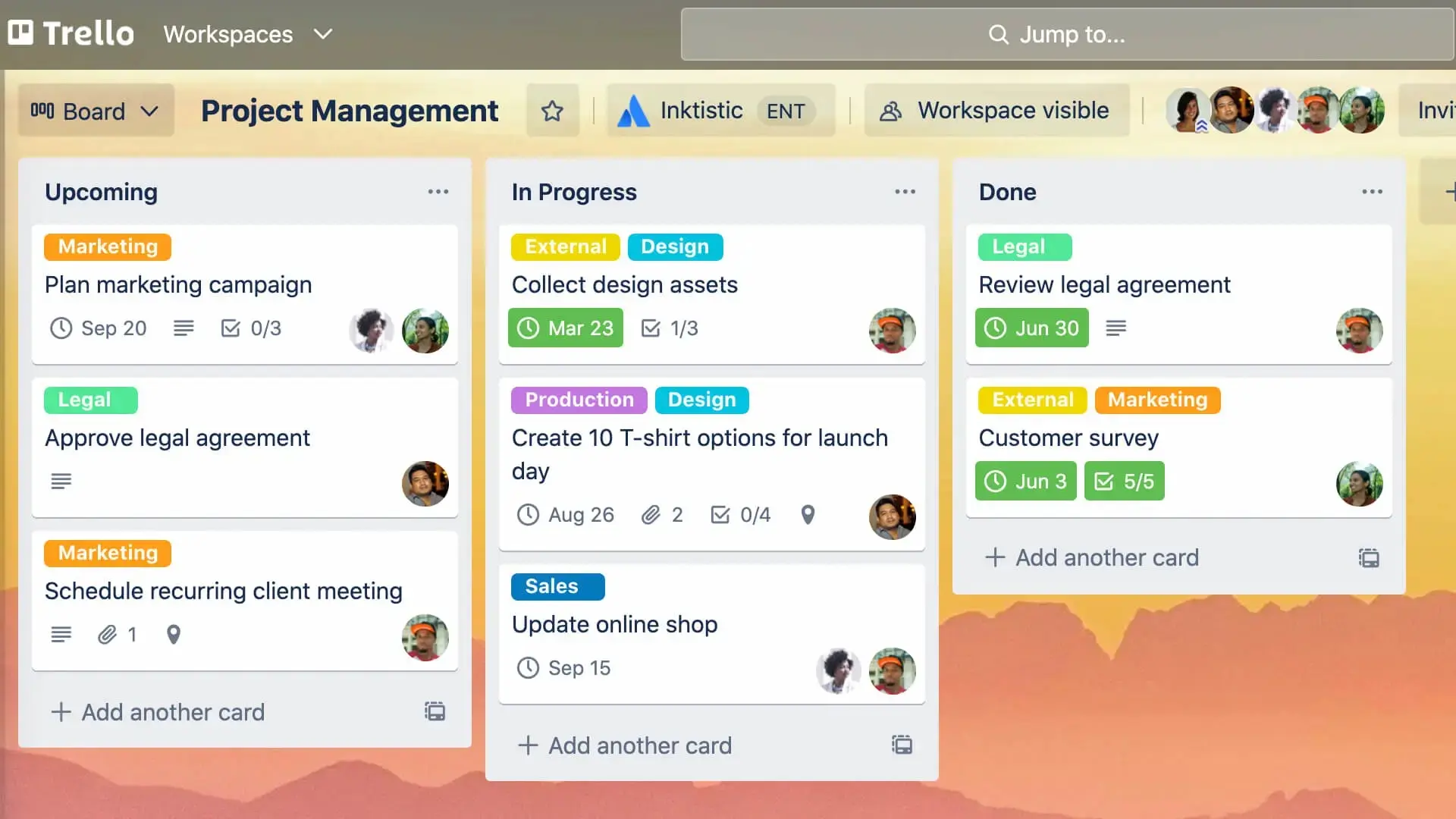
⚡ Best for ScaleTrello and Monday.com solve the same surface-level problem — keeping track of who’s doing what and when — but they do it from completely different positions. Trello is a Kanban board. It’s simple, visual, and fast to set up. Monday.com is a Work OS. It’s structured, powerful, and built to scale across departments.
The mistake most teams make is treating this as a features comparison. It isn’t. It’s a complexity vs. simplicity decision. Trello’s free plan is one of the best in the PM category — unlimited users, unlimited cards, 250 automations per month. Monday’s free plan caps at 2 users. If you’re a small team that won’t outgrow Kanban, you might never need to pay for anything.
Here’s where each tool actually makes sense — based on hands-on testing, verified pricing as of March 2026, and no vendor sponsorship on either side.
Platform Overview
Trello was founded in 2011 and acquired by Atlassian in 2017 for $425 million. Its entire design philosophy is borrowed from the Toyota Production System’s Kanban method: cards move across columns that represent stages of work. Boards, lists, cards — that’s the full hierarchy. There’s no sub-task nesting, no portfolio view, no resource management. What you see is what you get, and for a large number of teams, that’s exactly enough. Trello’s user base is estimated at over 50 million users, many of them on the free plan indefinitely.
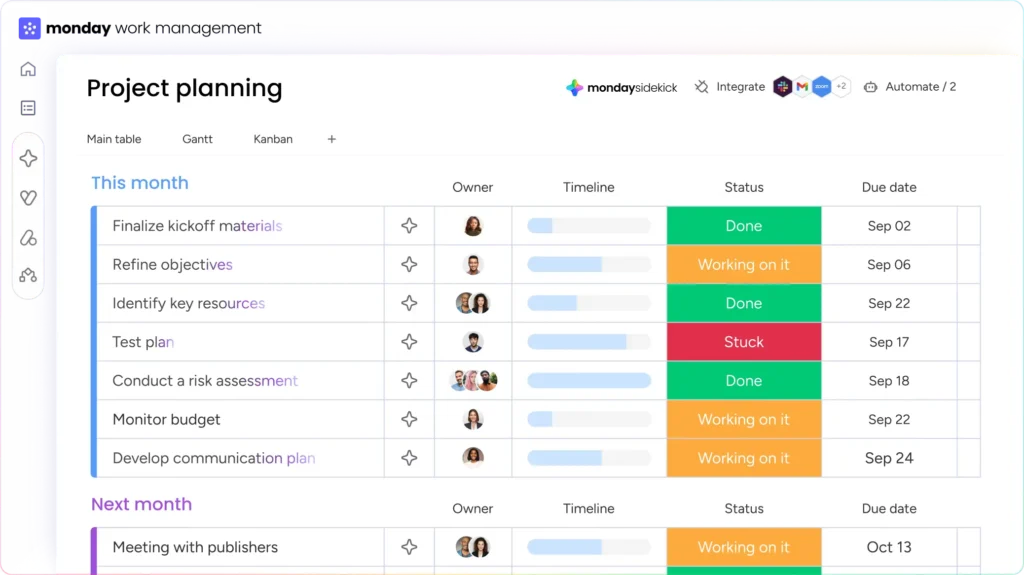
Monday.com launched in 2012 as dapulse, rebranded in 2017, and went public in 2021 at a $7.5 billion valuation. It positions itself as a Work OS — not just a project tracker, but a platform that can run sales CRMs, dev sprints, marketing campaigns, and HR workflows from the same interface. Its board system looks similar to Trello on the surface but adds column types, automations, 27+ views, and cross-board dashboards that Trello simply doesn’t have. The tradeoff is setup time and cost — Monday requires more configuration upfront and enforces a 3-seat minimum on all paid plans.
The underlying tension in this comparison is scale. Trello is optimized for getting started fast and staying lean. Monday is optimized for growing teams that need visibility across multiple projects and departments. Picking the wrong one at the wrong stage of your team’s growth costs you either capability or unnecessary complexity.
Feature-by-Feature Comparison
Ten criteria that matter most when choosing between a simple Kanban tool and a full Work OS.
| Feature | 🟦 Trello | ☰ Monday.com | Winner |
|---|---|---|---|
| Free Plan | Unlimited users, cards, 10 boards | 2 users max, 1,000 items | Trello |
| Seat Minimum (paid) | No minimum — pay per user | 3 seats minimum | Trello |
| Project Views | 7 (Board, List, Table, Calendar, Timeline, Dashboard, Map) | 27+ (Gantt, Workload, Chart, Map, Form…) | Monday |
| Automations (free plan) | 250 runs/month via Butler | ✗ Standard plan only | Trello |
| Native Time Tracking | ✗ Power-Up required | ✓ Pro plan+ | Monday |
| Gantt Charts | Premium plan only ($10/user) | Standard plan ($12/user) | Tie |
| Workload Management | ✗ Not available | ✓ Standard plan+ | Monday |
| Reporting & Dashboards | Basic card metrics only | 30+ widgets, cross-board dashboards | Monday |
| Learning Curve | Minimal — productive in minutes | Low–Moderate | Trello |
| Mobile App | Clean, full-featured | Good, but lags desktop | Trello |
Data as of March 2026. Verify current plan features on each platform’s pricing page before committing.
Pricing Breakdown
Trello is cheaper at every tier, and the gap is significant for small teams. A 5-person team on Trello Standard pays $25/month. The same team on Monday.com Basic pays $45/month — and that’s before you factor in the features those plans actually include. Trello Standard unlocks unlimited boards and custom fields. Monday Basic gives you unlimited items but locks out automations, Gantt, and timeline views entirely.
The more relevant comparison is Trello Premium ($10/user) vs. Monday Standard ($12/user). At that tier, Monday pulls ahead on features — you get automations, integrations, Gantt, and timeline views that Trello doesn’t include until its Power-Up layer. For teams that need those features, Monday Standard is better value than Trello Premium despite the higher sticker price.
Use Cases & Workflow Examples
The right tool depends on project complexity and team size more than any feature checklist. Here’s where each platform pulls ahead in practice.
Small Team Managing Simple Projects
A 5-person startup tracking product tasks, content deadlines, and support tickets across three boards. Trello’s free plan handles this indefinitely — unlimited users, unlimited cards, Butler automation for recurring tasks, and integration with Slack and Google Drive. A setup like this on Monday.com Basic would cost $45/month minimum for the same team. If your workflow fits “To Do → In Progress → Done,” Trello is the correct choice. Winner: Trello.
Marketing Team Running Quarterly Campaigns
A 12-person marketing team coordinating campaign briefs, design reviews, paid media schedules, and launch checklists across multiple channels. They need timeline visibility for the campaign manager, a Kanban board for the design team, and a dashboard summary for the VP. Monday.com’s multi-view system handles all three from one board. Trello requires the Premium plan for Timeline and Dashboard views, plus Power-Ups for any reporting — and even then, the cross-board visibility isn’t as clean. Winner: Monday.com.
Cross-Department Project Coordination
An operations team managing a product launch involving marketing, engineering, sales, and customer success. Each department owns a set of tasks, and leadership needs a single dashboard showing overall status, blocked items, and resource conflicts. Monday.com’s workload view and cross-board dashboards handle this natively on the Standard plan. Trello has no workload management feature at any tier. Winner: Monday.com — not close.
Nonprofit or Community Organization
A volunteer-run organization managing events, task assignments, and communications for 30+ members on a zero budget. Trello’s free plan supports unlimited users — the entire team can collaborate without anyone paying a dollar. Monday.com’s free plan caps at 2 users, making it useless for a team this size without a paid subscription. Winner: Trello.
Pros & Cons
Trello — Strengths & Limitations
- Best free plan in the PM category — unlimited users and cards
- No seat minimum — pay only for users you actually have
- Productive within minutes — zero learning curve
- 250 free automations/month via Butler
- Clean, fast mobile app consistently well-rated
- Kanban-only on free plan — other views require paid tiers
- No workload management at any tier
- Reporting is minimal — no cross-board dashboards
- Power-Ups are third-party with variable quality
- Performance degrades with 50+ cards on a single board
Monday.com — Strengths & Limitations
- 27+ project views — Gantt, Workload, Chart, Timeline, Map
- Robust automations built in from Standard plan up
- Cross-board dashboards give real visibility at scale
- Native time tracking on Pro plan
- Scales from 3-person teams to enterprise without migration
- 3-seat minimum makes it expensive for small teams
- Free plan practically useless — capped at 2 users
- Automations locked behind Standard plan ($12/user)
- Mobile app missing some desktop features
- Feature density can overwhelm teams coming from Trello
Integration Ecosystem
Both platforms connect to the same core SaaS stack. The difference is depth — Monday’s native integrations are more tightly woven into its automation engine, while Trello’s Power-Ups are third-party add-ons with inconsistent quality. For most teams, the tools that matter (Slack, Google Drive, GitHub, Microsoft Teams) are available on both.
Which One Should You Use?
Three questions that cut through the feature comparison and point to the right tool for your team right now.
Final Recommendation
Pick Trello if your team is small (under 10 people), your projects are straightforward, and Kanban covers your workflow. The free plan is genuinely capable — unlimited users, 250 automations per month, and all the core integrations. Many teams stay on it for years without hitting a wall. When you do need to upgrade, $5/user/month for Standard is one of the best-value paid tiers in the PM category.
Pick Monday.com if your team is growing, your projects involve multiple departments, or you need Gantt charts, workload management, and cross-board reporting. The 3-seat minimum is an annoying cost floor for small teams, but once you’re at 10+ people with complex coordination needs, Monday Standard at $12/user/month is better value than Trello Premium plus the Power-Ups you’d need to replicate those features.
The scenario that catches teams off guard: starting on Trello’s free plan, growing to 20+ people, and realizing the migration cost to Monday. If you’re already planning for that growth, consider starting on Monday’s Standard plan earlier — the configuration investment pays off faster when the team is still small enough to onboard cleanly.