Zapier vs Make (2026): Which Automation Platform Is Actually Worth It?
An in-depth, hands-on Zapier vs Make comparison for ops teams, developers, and SMB founders who need real numbers, workflows, and pricing facts.
Best for technical users who need complex logic and can’t justify Zapier’s per-task pricing at scale.
✓ Best Value
Best for non-technical teams who need fast deployment and won’t outgrow simple trigger-action flows.
⚡ Easier Setup
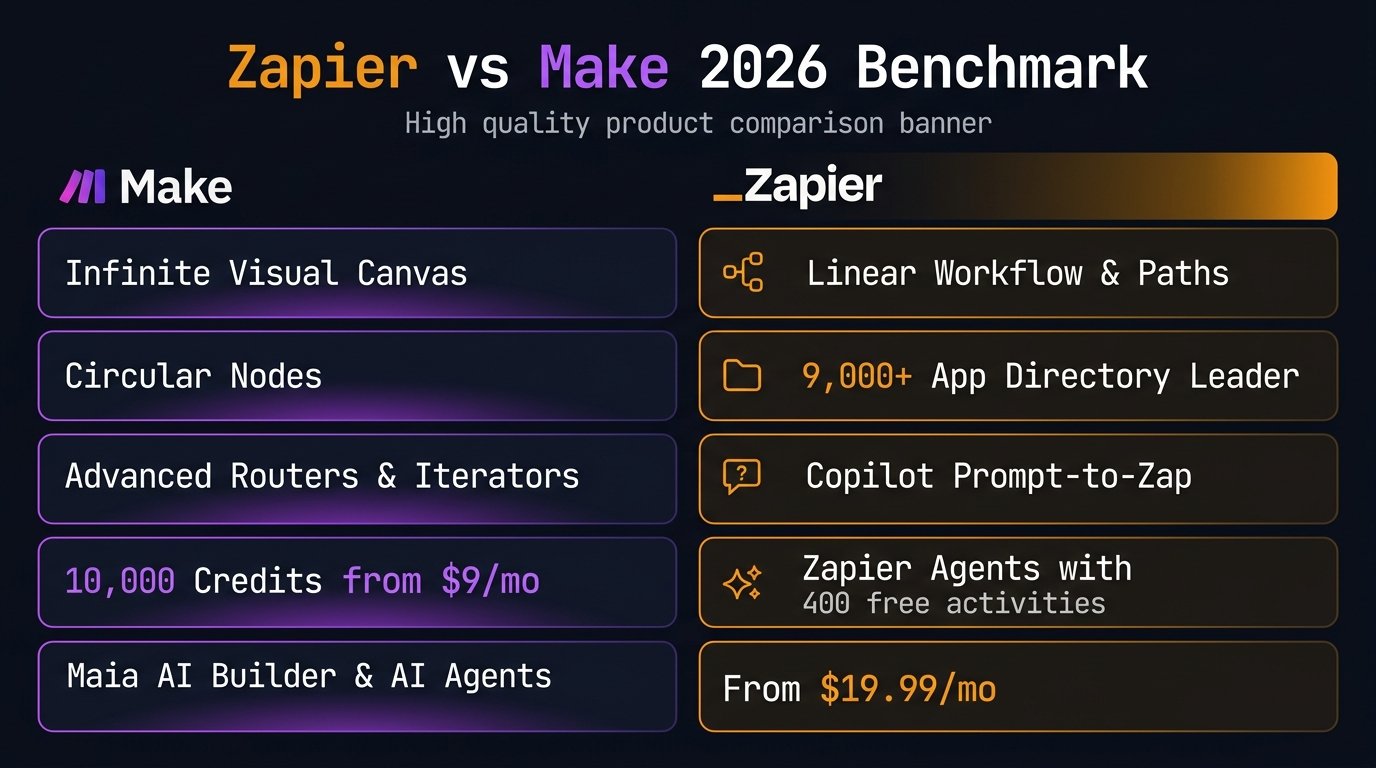
If you are weighing Zapier vs Make (formerly Integromat) in 2026, you are likely facing one of two headaches: your Zapier bill is compounding faster than your company revenue, or someone recommended Make for its visual canvas and you need to know if the learning curve is truly worth it. The Zapier vs Make comparison is the most critical automation decision ops teams, agencies, and business owners will make this year.
Both platforms share a core mission: eliminating repetitive manual work by linking your software stack together. However, the fundamental difference between Make and Zapier lies in pricing architecture (tasks vs. credits), branching logic flexibility, and time-to-deployment. Below is our comprehensive, data-driven comparison based on real-world automation testing in 2026.
- Platform Overview
- Feature-by-Feature Comparison
- Pricing Breakdown
- Use Cases & Workflow Examples
- Zapier vs Make by Industry: Which Fits Your Sector?
- AI Features in 2026
- Which Tool Fits Your Team Size?
- Switching Platforms: Migration Guide
- Integration Ecosystem
- Alternatives Worth Considering
- Frequently Asked Questions
- Final Recommendation
Zapier vs Make: Platform Overview & Core Architecture
Understanding the Make
vs Zapier
distinction starts with where each tool came from and what it was designed to do.
Make (formerly Integromat) launched in 2012 out of Prague. It was acquired by Celonis in 2020 and rebranded as Make in 2022. The core product is a visual canvas where you build workflow
— called scenarios — by connecting modules. Each module is a step, and you can branch, loop, filter, and route data between them with precision. Make is built for users who think in systems. The canvas shows you exactly how data flows through your automation, which makes debugging easier and complex logic more maintainable.
Zapier launched in 2011 in San Francisco and became the de facto standard for no-code automation. Its model is simple: pick a trigger app, pick an action app, connect them. That simplicity is both its biggest strength and its ceiling. For straightforward workflows it’s unbeatable. For anything with real conditional logic, you start hitting walls — or paying for workarounds.
The fundamental Make vs Zapier difference is architectural philosophy. Zapier optimizes for time-to-first-zap. Make optimizes for what’s possible once you know what you’re doing. Neither is wrong — they’re built for different users at different stages of automation maturity.
One pricing distinction worth knowing upfront before diving into the full Make vs Zapier comparison: Make charges per credit (formerly operations) — every module that executes in a scenario consumes one credit, though AI modules may consume additional credits based on model tokens. Zapier charges per task — every successful action step counts, but the trigger does not consume tasks. A 5-module Make scenario running 1,000 times uses approximately 5,000 to 6,000 credits. A 5-step Zapier zap (1 trigger + 4 actions) running 1,000 times consumes 4,000 tasks. That math determines which platform is actually cheaper for your specific volume.
Zapier vs Make: Feature-by-Feature Comparison
We tested both platforms across 10 criteria that matter to ops managers, developers, and growing SMBs. Here’s how Make vs Zapier stacks up across the features that actually drive the decision.
| Feature | ⬡ Make | ⚡ Zapier | Winner |
|---|---|---|---|
| Visual Builder | Canvas (node-based) | Linear step builder | Make |
| Free Plan Volume (per month) | 1,000 credits | 100 tasks (2-step Zaps only) | Make |
| Multi-step Workflows | ✓ Free plan (unlimited steps) | ✗ Paid only | Make |
| Native App Integrations | 3,000+ | 9,000+ (Leader) | Zapier |
| Error Handling | Built-in error routes (Commit, Rollback, Resume) | Basic retry only | Make |
| Minimum Execution Interval | 1 minute (Pro) / 15 min (Free) | 2 min (free: 15 min) | Make |
| Webhooks on Free Plan | ✓ Included | ✗ Paid only (Professional) | Make |
| AI & Agent Capabilities | Maia AI builder, Make AI Agents (beta), 350+ AI modules | Copilot Zap builder, Zapier Agents (400 free activities), AI steps | Tie |
| Learning Curve | Moderate–High | Low | Zapier |
| Data Stores (built-in DB) | ✓ All plans | ✗ Tables available separately | Make |
Make vs Zapier feature data verified as of October 1, 2026. Verify current limits on each platform’s pricing page before committing.
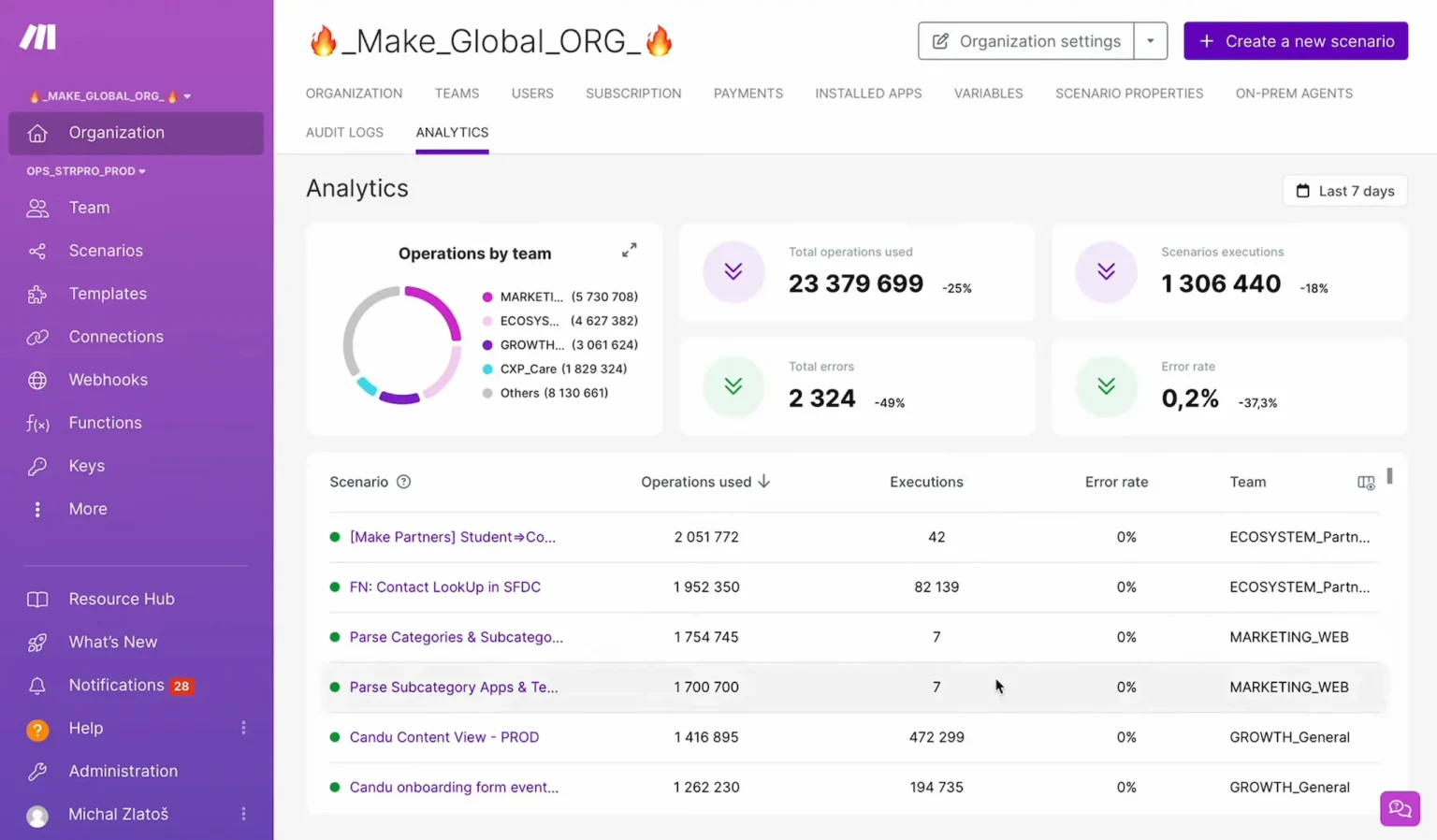
Make’s node-based canvas for complex routers, iterators & data mapping
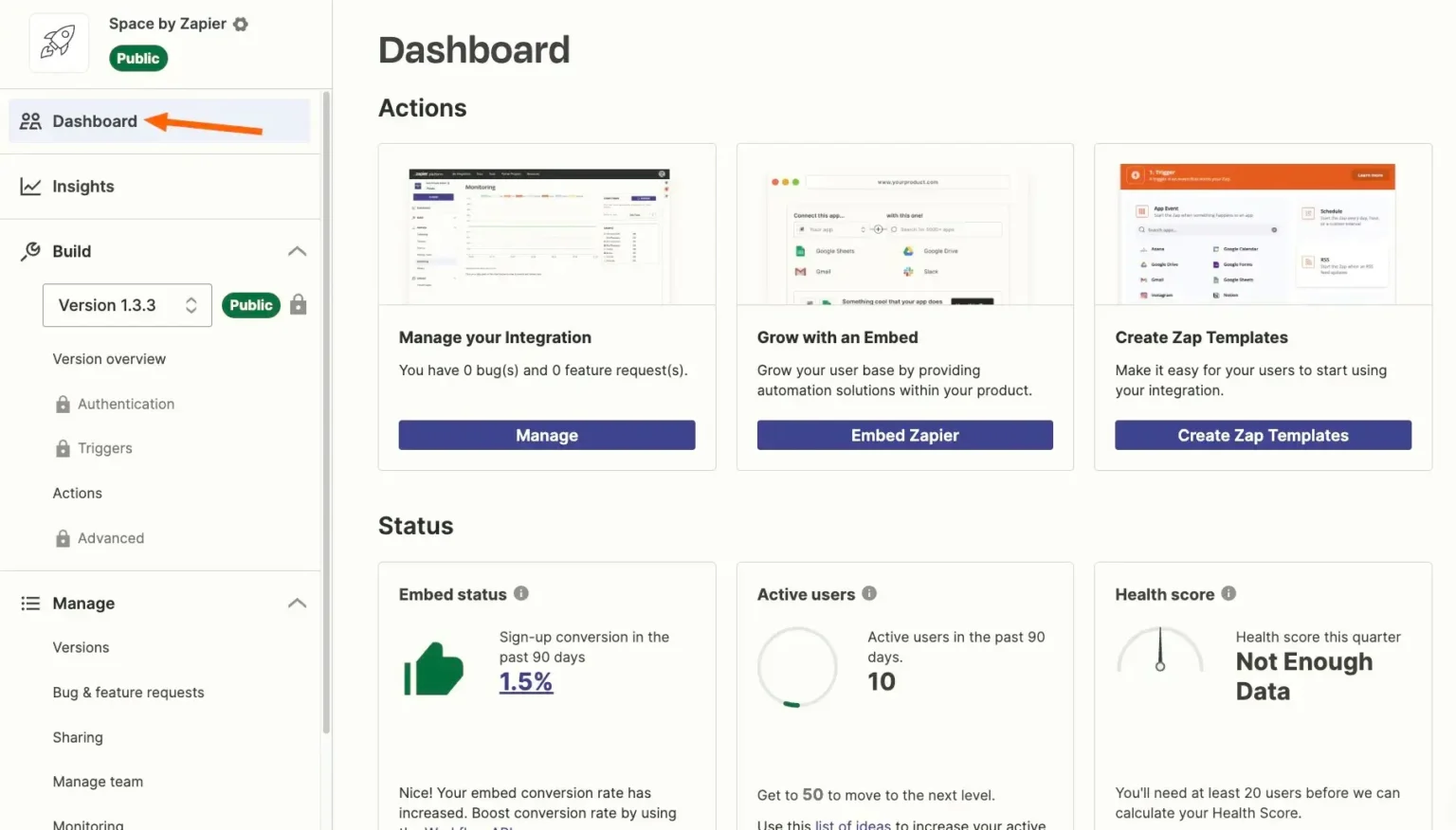
Zapier’s streamlined linear trigger-action workflow builder
Zapier vs Make: Complete Pricing Breakdown (Real Cost at Scale)
The Make vs Zapier pricing comparison is where the decision often gets made. Both use fundamentally different models, and the gap compounds fast as your volume grows.
Make charges per credit. Zapier charges per task. On paper that sounds similar. In practice it isn’t, because Make’s free plan gives you 1,000 credits versus Zapier’s 100 tasks (which are restricted to two-step Zaps) — a 10x difference before you spend a dollar. On paid plans, Make’s Core tier starts at $9.00/month on annual billing ($10.59–$12/month monthly) and covers 10,000 credits. On Zapier, the entry Professional plan starts at $19.99/month (annual billing) for only 750 tasks.
The Make vs Zapier cost gap widens further as workflow complexity increases. A 10-module Make scenario is cheaper per run than a 4-step Zapier zap at equivalent volumes once you’re past the Starter tier. Where Zapier justifies the premium: reliability guarantees, faster support response, and the breadth of 9,000+ native integrations.
Make counts operations (each module execution). Zapier counts tasks (each action step — trigger is free). A 5-module Make scenario uses 5 ops per run. A 5-step Zap uses 4 tasks. Run your actual volume math before choosing a plan — the sticker price comparison is misleading without it.
Real Cost Comparison at 5,000 Monthly Automations
| Scenario | Make Cost/mo | Zapier Cost/mo | Annual Savings (Make) |
|---|---|---|---|
| 5,000 simple 2-step flows (1 action step) | $9.00 (Core, annual) / $12 (monthly) | ~$89.00 (Pro 5k, annual) / $133.50 (monthly) | ~$960 to $1,450/year |
| 1,000 complex 6-step flows (5 actions = 5,000 tasks / ~6,000 credits) | $9.00 (Core, annual) / $12 (monthly) | ~$89.00 (Pro 5k, annual) / $133.50 (monthly) | ~$960 to $1,450/year |
| Under 100 simple automations | $0 (Free, 1,000 credits, multi-step) | $0 (Free, 100 tasks, 2-step only) | Make (10× volume & multi-step) |
Estimates verified against official vendor pricing on October 1, 2026. Make credits counted per module run; Zapier tasks counted per successful action step. Actual costs depend on workflow complexity and billing cycle.
Zapier vs Make: Real-World Use Cases & Workflow Examples
The Make vs Zapier choice shifts significantly depending on what your team actually automates. Here’s how each platform performs across the most common real-world scenarios.
Simple CRM → Slack Notification
A lead fills out a form, gets added to HubSpot, and a Slack message fires to the sales channel with their details. This is a 3-step linear flow. Zapier handles it in under 10 minutes with no technical knowledge — pick the trigger, pick the action, connect them. Make can do it too, but the canvas setup takes longer for no meaningful benefit on a flow this simple. Winner: Zapier.
E-commerce Order → Multi-Step Fulfillment
A Shopify order comes in. You need to create a fulfillment record, send a branded invoice via email, deduct from a Google Sheets inventory tracker, and log the sale to Airtable. That’s 4 parallel actions triggered by one event. Make’s router handles this cleanly — one trigger, four branches running simultaneously. In Zapier this requires multiple separate zaps with careful sequencing. Winner: Make.
Webhook → Conditional Processing
Your app fires a webhook with a JSON payload. Depending on the event type, you need different logic: new users get a welcome sequence, churned users get flagged in your CRM, payment failures trigger a retry flow. Make’s router and filter modules handle this natively on the free plan — webhooks included. Zapier requires a paid plan just to receive webhooks, and conditional branching is limited on Starter. Winner: Make.
Marketing Stack — Connecting 12+ Tools
Your team runs HubSpot, Mailchimp, Typeform, Calendly, Notion, Slack, Google Ads, and five others. You need them talking to each other across 8 simple automations. None of the flows are complex — they’re all trigger → action. Zapier’s 9,000+ native integrations mean every tool has a pre-built, tested connector. Make covers 3,000+ of them and uses HTTP modules for the rest. Winner: Zapier.
Pros & Cons: Head-to-Head Evaluation
Visual Logic & Value
- Visual canvas maps complex logic clearly
- Built-in error handling with custom routes
- 10× cheaper per credit/run vs Zapier at scale
- Webhooks and HTTP modules on the free plan
- Built-in data stores (lightweight key-value DB)
- 1-minute execution intervals on Pro
- Steep learning curve for non-technical users
- Smaller native app directory (3,000+ vs Zapier’s 9,000+)
- UI feels dense with large, complex scenarios
- Slower support response on lower-tier plans
- Smaller community and template library
Ecosystem Leader
- 9,000+ app integrations — widest coverage available
- Fastest setup for simple trigger-action flows
- Strong documentation and active community
- Copilot natural-language builder & Zapier Agents (400 free activities/mo)
- Reliable enterprise-grade uptime and SLAs
- 10× more expensive than Make at moderate-to-high volume
- Limited free plan (100 tasks, 2-step Zaps only)
- Webhooks require paid Professional plan ($19.99/mo annual minimum)
- Hard to debug complex multi-branch workflows
- Task consumption math is unpredictable at scale
Zapier vs Make by Industry: Which Fits Your Sector?
The Make vs Zapier question has different answers depending on your industry and what you’re automating. Here’s how the decision breaks down across the most common business types that evaluate both platforms.
| Industry / Team Type | Better Fit | Primary Reason |
|---|---|---|
| Marketing & Content Teams | Zapier | 9,000+ connectors cover the full marketing stack. Non-technical marketers are productive without developer help. |
| SaaS & Product Teams | Make | Webhook handling, conditional routing, and API calls are native. Complex product event automation is Make’s strongest use case. |
| E-commerce & Retail | Make | Multi-step order flows with parallel branches (fulfillment + inventory + CRM) are significantly cleaner in Make’s canvas. |
| Agencies & Freelancers | Make | Cost efficiency at volume, free webhooks, and data stores for client state management. Make saves agencies hundreds per month vs Zapier at equivalent task counts. |
| HR & People Operations | Zapier | HRIS integrations (BambooHR, Workday, Greenhouse) are more complete on Zapier. Simple onboarding automation deploys in an afternoon. |
| Finance & Operations | Split | Simple approval flows → Zapier. Complex multi-system reconciliation or conditional routing → Make. |
| Software Development | Make | HTTP module connects to any REST API. Developers can build custom logic without native connectors. GitHub, Jira, and CI/CD integrations are solid. |
| Early-Stage Startups | Make Free | 1,000 operations/month at $0 with webhooks included. Zapier’s free plan (100 tasks, no webhooks, no multi-step) is effectively unusable for real automation at this stage. |
| Enterprise / Large Orgs | Zapier | Zapier’s enterprise compliance, SSO, and audit logging are more mature. Non-technical department heads can own their automations without IT involvement. |
Zapier vs Make AI Features in 2026 (Zapier Agents & Copilot vs Make Maia & AI Agents)
Both platforms heavily evolved their AI capabilities through 2025 and 2026. Evaluating Make vs Zapier AI is essential for operations teams designing autonomous, multi-modal workflows.
Make AI Capabilities: Maia, Make AI Agents & 350+ Modules
In 2026, Make offers a complete, branded AI ecosystem. Maia by Make is an intelligent conversational assistant that lets you build scenarios and configure modules entirely through natural language dialogue. Beyond builder assistance, Make introduced Make AI Agents (in beta), enabling autonomous agents to reason, evaluate dynamic variables, and execute decision loops directly inside scenarios. Furthermore, Make integrates 350+ dedicated AI apps as drag-and-drop modules (including OpenAI, Anthropic Claude, Google Gemini, and Perplexity), allowing you to extract structured JSON data, generate dynamic prompts, and apply visual error handling across AI nodes.
Zapier AI Capabilities: Copilot, Zapier Agents & Canvas
Zapier’s AI strategy centers on ease of deployment and autonomous teammates. Copilot allows non-technical users to describe workflows in plain English (e.g., “When a lead signs up in Typeform, classify their industry with an AI step, enrich their profile in HubSpot, notify #enterprise-sales in Slack, and draft an intro email in Gmail”) and builds the multi-step Zap instantly. Zapier Agents go further by acting as autonomous digital coworkers that take actions across your connected apps, with 400 free activities per month included on the free tier. Zapier also provides Canvas for architectural visualization and native Code by Zapier steps for custom Python/JavaScript execution.
| AI Capability | ⬡ Make | ⚡ Zapier | Edge |
|---|---|---|---|
| Natural Language Workflow Builder | ✓ Maia by Make | ✓ Copilot | Tie |
| Autonomous AI Agents | ✓ Make AI Agents (beta) | ✓ Zapier Agents (400 free/mo) | Tie (Zapier for fast setup, Make for complex routing) |
| LLM & AI App Modules | ✓ 350+ native AI modules | ✓ Major LLMs + AI steps | Make (granular parameter tuning) |
| AI in Conditional Routing | ✓ Native via visual routers & filters | Paths (requires higher plans) | Make |
| Custom Code Steps | ✓ Custom functions & HTTP | ✓ Code by Zapier (JS/Python) | Zapier (more accessible) |
| Entry Price for AI Features | ✓ Free plan (1,000 credits) | Free (Agents 400 activities) / Pro for Copilot | Make (cheaper entry for full workflows) |
For AI workflow automation, Make wins on logical depth, data mapping, and cost — you can orchestrate complex multi-branch AI reasoning on the Core plan ($9/mo) with granular prompt control. Zapier wins on rapid deployment — Copilot and Zapier Agents allow non-technical teams to deploy autonomous AI agents across 9,000+ apps without configuring webhooks or parsing raw JSON.
Zapier vs Make: Which Tool Fits Your Team Size?
The right answer in the Make vs Zapier decision shifts depending on how many people will use the tool and how they work.
Solo Operators and Freelancers
Use Make Free. There is no meaningful competition in the Make vs Zapier comparison at this tier. Make’s free plan gives you 1,000 credits per month, multi-step scenarios, webhooks, and data stores — all at $0. Zapier’s free plan caps you at 100 tasks, blocks webhooks, and limits you to two-step zaps. For a solo operator who needs to automate client onboarding, invoice reminders, or CRM updates, Make’s free tier is a full working environment. Zapier’s free tier is a demo.
Small Teams (2–10 people)
Run the Make vs Zapier comparison against your actual workflows before committing. If your team is non-technical and needs automations running this week, Zapier Starter at $19.99/month gets you there faster. If anyone on your team is comfortable with a visual builder, Make Core from $9.00/month covers 10x more runs at roughly half the price. At 5 users running moderate automation volume, Make typically saves $400–$600/year over Zapier at comparable capability levels.
Mid-Size Teams (10–50 people)
The Make vs Zapier cost gap becomes a real budget line at this scale. Make’s Teams plan from $29/month covers unlimited members with shared workspaces, role permissions, and team templates. Zapier’s Team plan at $69/month covers 2,000 tasks but tasks get consumed faster as more team members build zaps. For ops-heavy mid-size teams with technical resources, Make’s lower per-operation cost and better error handling typically justify the steeper learning curve.
Enterprise (50+ people)
Zapier is the safer enterprise choice in the Make vs Zapier comparison at this scale. Zapier’s enterprise compliance, SSO maturity, SAML support, audit logging, and dedicated success managers make it easier to deploy across departments with varying technical comfort. Make has an Enterprise tier but its compliance and governance features are less mature. If your organization needs to roll automation out to non-technical business units — HR, finance, marketing — Zapier’s lower adoption friction is worth the higher per-task cost.
Solo or under 5 people → Make Free or Core. Technical team of 5–20 → Make Pro, saves $400+/year vs Zapier. Non-technical team of any size → Zapier Starter is worth the price premium for adoption speed. 50+ people needing cross-department rollout → Zapier Enterprise.
Switching Platforms: Zapier vs Make Migration Guide
Many teams evaluate Make vs Zapier after already using one of them. Migration is manageable in both directions, but there are specific things to plan for.
Moving from Zapier to Make
There’s no direct import tool from Zapier to Make — you rebuild scenarios manually. The process is actually easier than it sounds for most workflows. Open your Zapier dashboard, document each active zap (trigger app, trigger event, action steps), then rebuild them as Make scenarios. For simple 2–3 step zaps, rebuilding takes 15–30 minutes per scenario. For complex multi-step zaps, plan 1–2 hours each to rebuild and test properly in Make’s canvas.
What you gain in the switch from Zapier to Make: webhooks on the free plan, better error handling, significantly lower per-operation cost at volume, and visual debugging that makes maintenance easier. What you lose: some native integrations (check your specific stack against Make’s connector list before committing), Zapier’s AI builder, and the institutional knowledge your team already has in Zapier.
Realistic timeline: 1–2 weeks of parallel running for a team of 5 with 20–30 active automations.
Moving from Make to Zapier
Zapier has no Make importer. You export your scenario logic manually and rebuild as Zaps. The main challenge moving from Make to Zapier is structural: Make’s router-based conditional logic doesn’t map cleanly to Zapier’s linear step model. Complex Make scenarios with multiple branches need to be split into separate Zaps in Zapier, which increases your task consumption and makes the workflow harder to maintain.
The most common reason teams switch from Make to Zapier: a key tool in their stack only has a Zapier connector, or the team grew to include non-technical members who struggle with Make’s canvas.
Realistic timeline: 1 week for a team running 15–20 Make scenarios, assuming no highly complex branching logic.
Run both platforms in parallel for at least 2 weeks before cutting over. Import a sample of real workflows and test them against actual live data. The Make vs Zapier migrations that go badly are almost always the ones where the team deactivated the old tool before validating the new one under real load.
Zapier vs Make: Integration Ecosystem & App Support
Integration count is one of the most-cited factors in the Make vs Zapier comparison, but count alone is misleading. What matters is whether your specific stack is covered — and at what depth.
9,000+
HubSpot
Slack
Gmail
Shopify
Notion
Stripe
3,000+
Google Sheets
OpenAI
Stripe
Any REST API via HTTP
Make’s HTTP module effectively closes the integration gap for technical users. Any app with a REST API can be connected to Make with standard webhooks and JSON headers. Any app with a REST API can be connected to Make without a native connector. The 3,000+ vs 9,000+ difference matters most for non-technical teams who need plug-and-play connections without any API configuration. Before making the Make vs Zapier call based on integrations, check whether your 5 most-used tools have native connectors on both platforms — that’s the only number that matters.
Zapier vs Make Alternatives Worth Considering in 2026
There are scenarios where neither Make nor Zapier is the right answer. Here’s where to look if the Make vs Zapier comparison doesn’t produce a clear winner for your situation.
n8n — Best for Self-Hosted Automation
If data privacy, compliance, or cost at very high volume are your primary concerns, n8n is worth a serious look. n8n is open-source, self-hostable, and free if you run it on your own infrastructure. It has a visual canvas similar to Make’s, 350+ native integrations, and no per-task or per-operation limits. The trade-off: you’re responsible for hosting, uptime, and maintenance. Cloud-hosted n8n starts at $20/month. For technical teams with DevOps capacity, n8n can be cheaper than both Make and Zapier at high automation volumes.
Microsoft Power Automate — Best for Microsoft Stacks
If your organization runs Microsoft 365, Teams, SharePoint, and Dynamics, Power Automate is likely the right choice over both Make and Zapier. It’s included in most Microsoft 365 business subscriptions, integrates natively with the entire Microsoft ecosystem, and has strong enterprise governance features. The limitation: it’s clunky for non-Microsoft integrations and the licensing model is confusing. Outside the Microsoft stack, Make and Zapier are both better tools.
Pipedream — Best for Developers
Pipedream is a developer-first automation platform that runs Node.js, Python, Go, and Bash as workflow steps. If you’re a developer who wants full code control without the constraint of a visual builder, Pipedream is a legitimate alternative to Make for technical automation. The free tier is generous (10,000 invocations/month). The trade-off: there’s no visual no-code interface — it’s built for engineers, not ops teams.
| Tool | Best For | Free Plan | Starting Price |
|---|---|---|---|
| Make | Technical teams, complex logic | ✓ 1,000 ops/mo | $10.59/mo |
| Zapier | Non-technical teams, wide integrations | ✓ 100 tasks/mo | $19.99/mo |
| n8n | Self-hosted, high-volume, compliance | ✓ Self-hosted free | $20/mo (cloud) |
| Power Automate | Microsoft 365 environments | Included in M365 | $15/user/mo (premium) |
| Pipedream | Developer automation, custom code | ✓ 10,000 invocations/mo | $19/mo |
My Take — WorkflowAces
After testing both platforms extensively and building real automations on each, here’s how I actually think about the Make vs Zapier decision — not as a feature checklist, but as someone who’s watched teams commit to the wrong tool and pay for it.
The Make vs Zapier framing people typically use is wrong from the start. They compare operation counts and per-user pricing without asking the more important question: what kind of user is actually going to build and maintain these automations?
If the person building automations is a developer, a technical ops manager, or anyone comfortable with a visual node-based canvas, Make is almost always the better choice. The learning curve is real — plan a week to get comfortable — but the payoff is significant: better error visibility, cleaner logic for complex workflows, and a cost structure that doesn’t penalize you for running automations frequently. I’ve seen teams cut their automation costs by $400–$800/year just by switching from Zapier Professional to Make Core for the same workload.
If the person building automations is a marketer, an account manager, or anyone who needs something running by end of week without learning a new tool, Zapier is the better choice. Copilot and Zapier Agents have genuinely closed the setup gap — you can describe what you want in plain English and get a working draft in under a minute. Zapier’s 9,000+ integrations mean your niche tools are almost certainly covered. And the linear step builder is intuitive enough that non-technical team members can own their own automations without engineering support.
The scenario where you run both Make and Zapier is more practical than it sounds: use Zapier for simple team-managed zaps that non-technical members own, and Make for backend workflows that touch APIs, need conditional routing, or run at high volume. It’s not the cheapest setup, but for growing teams where automation spans technical and non-technical work, it’s often the most sustainable one.
My actual recommendation by situation: solo operator or startup with any technical capacity → Make Free is one of the best free tiers in automation, full stop. Non-technical SMB team needing automations this week → Zapier Starter, worth every dollar of the premium for the time it saves. Technical team running 5,000+ automations per month → Make Pro at $18.82/month versus Zapier Professional at $49/month is an easy decision. Enterprise with cross-department rollout needs → Zapier, the adoption advantage at scale justifies the cost.
Both platforms have free tiers with no credit card required. Before committing to either side of the Make vs Zapier decision, build one real automation on each — not a tutorial, a live workflow that touches your actual tools. The one that felt easier to debug when something went wrong is your answer. Make’s error routes tell you exactly which module failed and why. Zapier’s error logs are simpler but less precise. That debugging experience difference compounds over months of running automations in production.
Zapier vs Make: Which One Should You Choose?
Three questions that cut through the noise in the Make vs Zapier decision and point to the right platform for your situation.
The Decision Framework: Make vs. Zapier in 2026
Three key operational tests to find the exact platform match for your team:
Zapier vs Make: Frequently Asked Questions (FAQ)
Is Make better than Zapier in 2026?
Make is better than Zapier for technical users who need complex logic, high automation volume, or cost efficiency. Make’s canvas, error handling, and operations-based pricing give it a clear edge for developers and technical ops teams. Zapier is better for non-technical teams who need automations running fast with minimal setup. The Make vs Zapier question doesn’t have a universal answer — it depends on who’s building the automations and what they’re automating.
Why is Zapier more expensive than Make?
Zapier’s pricing reflects its market positioning: it targets non-technical business users and enterprises who prioritize ease of use, integration breadth, and support over cost. Make targets more technical users who are willing to trade setup time for significantly lower per-operation costs. At 5,000 automations per month, Make Core from $9.00/mo ($12 monthly) covers most teams. Zapier Professional (5,000 tasks) costs ~$89/mo (annual) or $133.50/mo (monthly). That ~$960 to $1,450/year difference is Zapier’s “ease-of-use tax.”
Can Make completely replace Zapier?
For most technical teams, yes. Make covers the same core automation capabilities as Zapier and adds better conditional logic, error handling, and a dramatically better free tier. The gap is native integrations — Make has 3,000+ versus Zapier’s 9,000+. If your stack includes niche tools that only exist on Zapier, you’ll either need to keep Zapier or use Make’s HTTP module to connect them via API. For the majority of common SaaS tools, Make’s native connectors are sufficient.
Is Make free forever?
Yes. Make’s free plan has no time limit and includes 1,000 credits per month, multi-step scenarios, webhooks, HTTP modules, and 2 users. The limitations are credit volume (1,000 credits/month), execution intervals (minimum 15 minutes on free), and execution history (limited days). For solo operators and small teams with low automation volume, the free plan is a full working environment. Zapier’s free plan (100 tasks, two-step only, no webhooks) is far more restricted by comparison.
What’s the Make vs Zapier difference for webhooks?
This is one of the clearest practical differences in the Make vs Zapier comparison. Make includes webhook support on the free plan — you can receive and send webhooks without paying anything. Zapier requires a paid plan (Starter at $19.99/month minimum) to use webhooks. For technical teams building event-driven automations, this alone is often enough to choose Make over Zapier.
Which is better for beginners — Make or Zapier?
Zapier is significantly better for beginners. The linear step builder is intuitive, Copilot and Zapier Agents reduce setup to plain English, and the 9,000+ integrations mean most tools work out of the box without API configuration. Make’s canvas interface is powerful but genuinely confusing for first-time users — the node-based model, operation counting, and scenario structure require a learning investment before you’re productive. Start with Zapier if you’ve never automated anything before.
Does Make work without coding?
Yes, Make works without coding for the vast majority of use cases. The visual canvas is no-code — you connect modules by dragging and clicking, configure triggers and actions through forms, and set up filters and routers visually. Where Make requires more technical comfort than Zapier: understanding data mapping (how to reference fields from previous modules), setting up webhook payloads, and configuring error routes. None of these require writing code, but they do require a higher tolerance for abstraction than Zapier’s step-by-step builder demands.
What do real users say about Zapier vs Make?
G2 reviews as of early 2026: Make holds a 4.7/5 from 230+ reviews. Zapier holds a 4.5/5 from 1,200+ reviews. The pattern in user feedback is consistent. Make users praise the pricing, the visual canvas for complex logic, and the free tier generosity. Common complaints: the learning curve, UI density at scale, and support response times on lower-tier plans. Zapier users praise ease of use, integration breadth, and reliability. Common complaints: pricing at scale, task consumption being difficult to predict, and the feeling of hitting a logic ceiling on complex workflows. The Make vs Zapier G2 data reflects exactly what you’d expect: Make wins on technical depth and value, Zapier wins on accessibility and polish.
Final Verdict: Zapier vs Make in 2026
Pick Make if you’re technical, running real volume, or need workflows with actual logic — iterators, routers, error handling, API calls. The learning curve is real but the ceiling is much higher and the cost per operation is significantly lower at scale. Make’s free plan alone is better than Zapier’s paid Starter tier for anyone comfortable with visual builders.
Pick Zapier if you’re on a non-technical team, need automations running this week, and your stack is built around mainstream SaaS tools. The 9,000+ integrations, Copilot builder, and Zapier Agents remove friction that would otherwise cost you hours. At enterprise scale, Zapier’s governance and compliance features justify the premium.
The one case where running both Make and Zapier makes sense: use Zapier for simple team-owned zaps that non-developers manage, and Make for the complex backend workflows that touch APIs or need conditional logic. It’s not the cheapest setup, but for growing teams where automation work spans technical and non-technical workflows, it’s often the most pragmatic one.
Build one real multi-step workflow on each platform before buying. On Make, connect a webhook with a router and filter. On Zapier, build a multi-step zap. Whichever canvas gives your team greater confidence and visibility is the one you will actually stick with.
Zapier pricing scales exponentially past 10,000 monthly tasks. If your company triggers automations from e-commerce checkouts, webhooks, or CRM form fills, Make’s $16.00/mo Pro plan covers 10,000 credits where Zapier’s 10,000-task tier quickly exceeds $175+/mo. Run your expected math before choosing annual billing.