Best AI Workflow Automation Tools in 2026: Make, Zapier, n8n & Beyond
A definitive, data-backed guide comparing integration depth, AI agent autonomy, execution limits, and true operational costs for modern businesses.
What Is AI Workflow Automation?
AI workflow automation connects your apps so that repetitive work runs on its own — and adds AI steps that can read, classify, summarize, or decide instead of just moving data. A classic automation follows fixed rules: when a form is submitted, add a row to a spreadsheet. An AI-powered workflow can go further: when a support email arrives, detect its intent and urgency, draft a reply, route it to the right person, and log it in your CRM.
In 2026 these tools fall into three groups:
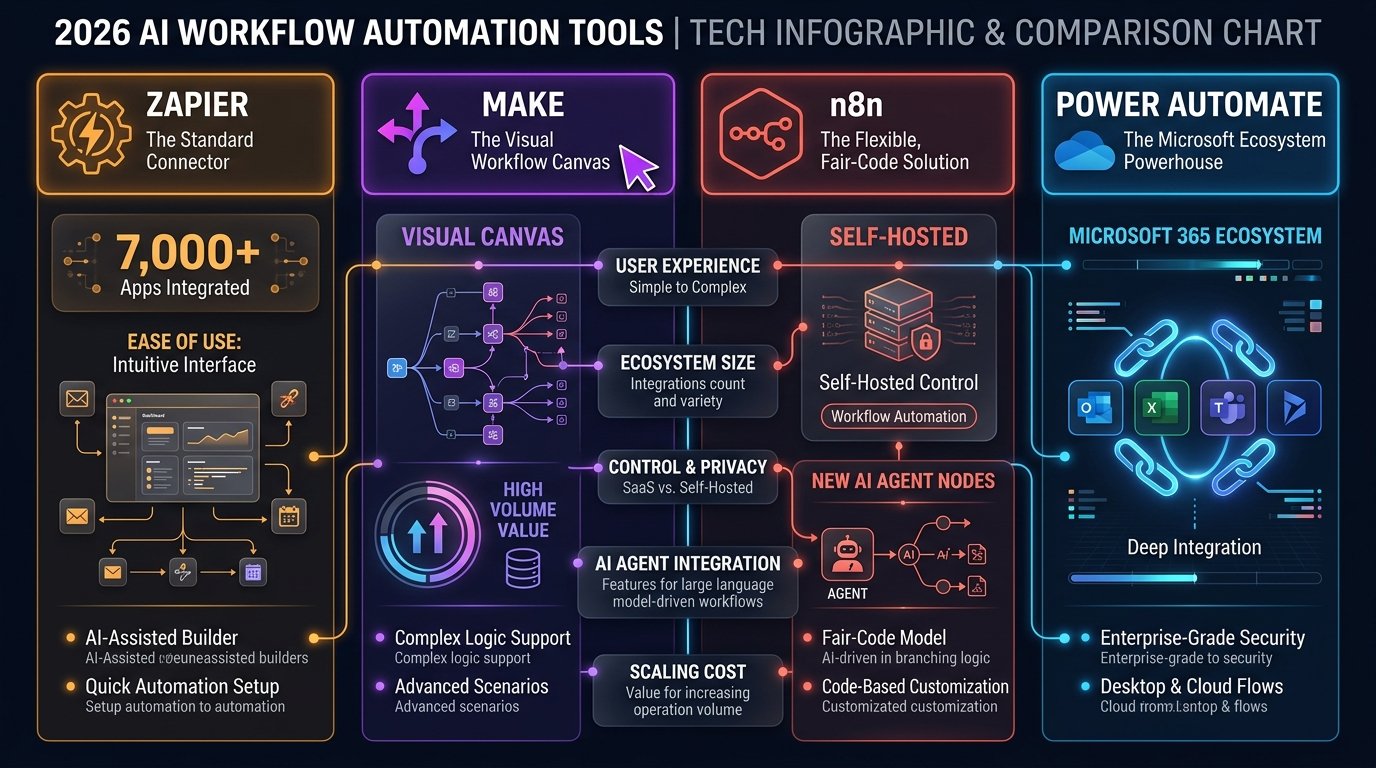
- App connectors like Zapier and Make, which link thousands of SaaS apps and now include AI steps and agents.
- Developer-oriented engines like n8n, which add custom code, self-hosting, and advanced AI agent nodes.
- Enterprise platforms like Power Automate and Workato, built for governance, compliance, and large IT environments.
The right choice depends less on “which has the most AI” and more on three questions: how technical your team is, how many runs you’ll execute per month, and where your data is allowed to live.
Quick Picks: Best AI Workflow Automation Tools at a Glance
#1 FOR NON-TECHNICAL TEAMS
BEST VALUE & VISUAL CANVAS
BEST FOR DEVELOPERS & AI AGENTS
BEST FOR MICROSOFT 365
BEST FOR ENTERPRISE iPaaS
Trying to decide between the two biggest names on this list? We compare costs, limits, and error handling side by side in our full guide: Make vs Zapier (2026): Which Automation Platform Wins? →
Evaluation Criteria: What Makes a Top AI Automation Tool in 2026
Not every software tool with an “AI” tag is truly built for mission-critical workflows. In 2026, automation has evolved from simple linear triggers (IFTTT-style) into agentic, multi-modal workflows that parse unstructured documents, make real-time decisions, and execute self-healing retry logic. We evaluated each platform across four rigorous operational criteria:
| Criterion | Operational Benchmark | Why It Matters in 2026 |
|---|---|---|
| Integration Library & Depth | Volume of maintained native connectors, plus granularity of triggers, actions, and search endpoints. | A connector count under 1,000 creates painful gaps. High-depth connectors eliminate the need for custom webhook scripting. |
| AI-Native Agent Orchestration | Built-in natural-language builders, document parsers, multi-model LLM nodes, and autonomous loop handlers. | Modern workflows must interpret sentiment, classify messy customer emails, and extract JSON schema on the fly without breaking. |
| Unit Cost & Scalability (TCO) | Task vs. operation/credit pricing mechanics, overage fees, step multipliers, and entry-tier viability. | Task-based pricing can scale exponentially as your business grows, turning a $20/mo bill into $500+/mo. Transparency is non-negotiable. |
| Error Observability & Self-Healing | Live execution logs, rollback buffers, branch-level error routing, and dead-letter queue alerting. | Silent failures cause undetected data drift across your CRM and accounting tools. Robust error routing prevents disaster. |
2026 AI Workflow Automation Tools: Full Benchmark Comparison
Here is how the five leading platforms compare directly across pricing, integration count, AI capabilities, self-hosting options, and execution models:
| Platform | Entry Paid Price | Free Tier | Integrations | AI Capabilities | Execution Architecture | Best Suited For |
|---|---|---|---|---|---|---|
| ✦ Zapier | From $19.99/mo (750 tasks, billed annually) | 100 tasks/mo, 2-step Zaps only | 9,000+ (Leader) | Zapier Agents, Copilot, AI steps, Canvas | Linear & Paths (Sequential) | Non-technical teams, rapid SaaS connectivity |
| ✦ Make | $12/mo monthly ($9/mo annual, 10k credits) | 1,000 credits/mo | 3,000+ | Maia AI builder, Make AI Agents (beta), AI app modules, Visual Routers | Visual Drag-and-Drop Canvas (Parallel) | Ops builders, complex logic, high-volume value |
| ✦ n8n | €20/mo Cloud, billed annually (2,500 executions) / Free self-hosted | Unlimited (self-hosted Community Edition) | 800+ | Native AI Agent nodes, LangChain, Vector Stores | Node Graph & Custom JS/Python | Technical engineers, local privacy, custom LLMs |
| ✦ Power Automate | $15/user/mo (billed annually) | 30-day free trial (standard flows included in select M365) | 1,000+ | Copilot, AI Builder | Sequential & Desktop RPA | Organizations locked into Microsoft 365 |
| ✦ Workato | Custom (estimated $10k+/yr) | No free tier | 1,000+ Enterprise | Workato Copilot, GenAI recipes | Recipe-based with Governance | Fortune 500 enterprise compliance & IT governance |
In-Depth Platform Reviews: Strengths, Limits & Real-World ROI
Zapier
The Universal SaaS Connector & Natural-Language Automation Standard
Zapier remains the undisputed titan of ecosystem size. Its library exceeds 9,000+ apps — roughly three times Make’s catalog. In practical terms, this means that virtually any niche CRM, marketing tool, form builder, or billing portal your team adopts already has a verified Zapier connector with native trigger and action webhooks. For non-technical teams, that breadth eliminates the friction of building custom API requests from scratch.
In 2026, Zapier’s AI story has two parts. Copilot lets you describe a workflow in plain English (e.g., “When a high-value lead signs up in Typeform, classify their industry with an AI step, enrich their profile in HubSpot, notify #enterprise-sales in Slack, and draft an intro email in Gmail”) and builds the multi-step Zap for you. Zapier Agents go further: AI teammates that can take actions across your connected apps on their own, with a free tier of 400 activities per month.
The Catch: Cost scaling. Zapier bills per task: every successful action step counts, while triggers don’t. A Zap with 5 action steps running 30 times a day uses 4,500 tasks per month, which pushes you well above the entry tier. For high-frequency automation, Zapier is usually the most expensive of the three per run — see the real cost example below.
- Massive 9,000+ app directory covers almost every modern SaaS tool.
- Zapier Agents: AI teammates that act across your apps (400 free activities/month).
- Copilot builds multi-step Zaps from plain-English prompts.
- Canvas feature allows holistic architectural mapping of connected flows.
- Task-based pricing becomes costly at high transaction volumes.
- Linear execution model feels clunky for complex multi-path branching.
- Free tier is limited to 100 tasks/mo and two-step Zaps — fine for testing only.
Make (formerly Integromat)
The Visual Canvas Leader for Parallel Branching & Low Cost Per Run
Make is the top choice for operations specialists, automation agencies, and power users. Instead of forcing you into a single vertical timeline, Make gives you an interactive, infinite visual canvas where data flows through circular nodes like electricity through a circuit board. You can split one trigger into four parallel branches, run conditional filters on each branch, aggregate array payloads, and apply granular error-handling directives (Commit, Resume, Ignore, Rollback) with visual perfection.
Where Make pulls ahead is pricing math. The Core plan includes 10,000 credits per month for $12 on monthly billing (less on annual). Zapier’s entry plan starts at $19.99/month for a far smaller task allowance (750 tasks). For businesses running thousands of webhook transformations, e-commerce syncs, or content distribution cycles each week, Make delivers many times more runs per dollar.
Make has also built AI into the platform. Maia by Make lets you build automations and AI agents through natural conversation, Make AI Agents (in beta) can reason and act inside your scenarios, and 350+ AI apps are available as modules.
- Superior visual drag-and-drop canvas for complex branching and routers.
- 10,000 credits from $12/mo — one of the best price-to-volume ratios in automation.
- Granular data parsing, array aggregators, and enterprise error directives.
- Free plan includes 1,000 credits/mo with full visual editor access.
- Steeper learning curve for non-technical users unfamiliar with JSON arrays.
- Smaller app directory (3,000+) than Zapier’s 9,000+.
n8n
The Fair-Code, Self-Hostable Engine for Autonomous AI Agents & Strict Data Privacy
n8n is the fastest-rising automation engine in the tech community, built on a fair-code model. If your company operates under GDPR, HIPAA, or strict financial privacy mandates, hosting your automations in multi-tenant SaaS clouds (like Zapier or Make) can trigger security compliance nightmares. n8n solves this by offering a 100% self-hostable Docker container that runs entirely inside your own AWS, Hetzner, or private VPC infrastructure for $0 in license fees.
In 2026, n8n has become the premier platform for building Autonomous AI Agents. Its native AI nodes integrate directly with LangChain, LlamaIndex, OpenAI, Anthropic, and local models via Ollama. You can build multi-agent workflows where an AI researcher pulls web data, hands the findings to an AI summarizer, checks a Pinecone or Supabase vector store for historical context, and triggers transactional webhooks based on autonomous decision-making.
n8n also prices differently from Zapier and Make: it charges per execution, and one execution is a complete run of your workflow no matter how many steps it contains. A 20-step AI workflow that runs once costs one execution in n8n, but 20 tasks in Zapier. For long, multi-step flows, that difference compounds fast.
The Catch: It requires technical competence. If self-hosting, your engineering team is responsible for server provisioning, PostgreSQL maintenance, Redis queuing, and version updates. While n8n offers a managed Cloud plan from €20/month (billed annually, 2,500 executions), the platform is distinctly geared toward developers and tech-savvy ops teams who aren’t afraid of writing JavaScript or Python snippets.
- Can be self-hosted on your own servers with zero per-task or per-operation fees.
- Industry-leading AI Agent nodes with native LangChain and Vector DB support.
- Full JavaScript / Python custom code execution directly inside nodes.
- Self-hosting keeps workflow data on infrastructure you control — a strong fit for regulated industries.
- Pricing per full workflow execution, not per step.
- Requires dev/DevOps skills to self-host and maintain infrastructure.
- Smaller native app directory (~800+) than Zapier or Make.
Microsoft Power Automate
The Native Powerhouse for Microsoft 365, Teams, SharePoint & Desktop RPA
If your organization runs on Microsoft 365 — Outlook, SharePoint, Excel, Teams, Azure Active Directory, and Dynamics 365 — third-party connectors often introduce needless administrative barriers. Power Automate is baked directly into the Microsoft tenant. It handles user permissions, corporate Single Sign-On (SSO), and internal governance natively without needing external API tokens.
Power Automate also bridges the gap between modern cloud APIs and legacy desktop systems via Robotic Process Automation (RPA). If you have legacy desktop accounting software that lacks a REST API, Power Automate Desktop can record keyboard inputs and screen actions to automate data entry. Furthermore, its AI Builder module allows non-coders to train custom document extraction models (invoices, receipts, contracts) with zero ML expertise.
The Catch: The user interface feels bureaucratic and slow compared to the fluid drag-and-drop of Make or Zapier. Furthermore, connecting to non-Microsoft apps (Salesforce, Stripe, Jira) often requires “Premium Connectors”, which can quickly complicate licensing tiers across large teams.
- Flawless native integration with Microsoft 365, Teams, and SharePoint.
- Powerful Desktop RPA capability for automating legacy Windows software.
- AI Builder simplifies invoice, receipt, and contract OCR document parsing.
- Corporate enterprise compliance managed through existing Azure IT policies.
- Clunky, slower interface compared to modern agile web canvases.
- Third-party SaaS integrations frequently gated behind expensive Premium licenses.
Workato
The Enterprise-Grade Integration Platform as a Service (iPaaS)
Workato is not designed for solo freelancers or seed-stage startups; it is a dedicated Enterprise Integration Platform (iPaaS) aimed at mid-market and Fortune 500 corporations. When hundreds of employees across HR, finance, sales, and supply chain require automated “recipes” connecting Workday, NetSuite, SAP, and Snowflake, consumer-grade tools lack the audit trails, role-based access control (RBAC), and SOC2 Type II certifications that IT directors demand. Workato delivers bank-grade infrastructure designed for institutional scale.
In 2026, Workato integrates generative AI across its recipe lifecycle with Workato Copilot. Beyond flow building, it continuously monitors enterprise data pipelines, predicts sync errors before batch processing fails, and automates schema reconciliation when enterprise databases update column definitions.
The Catch: High barrier to entry. Pricing isn’t published; industry estimates typically start around $10,000+ per year and scaling up rapidly based on recipe packs and connection endpoints. Unless you have dedicated enterprise procurement budgets, Workato is overkill.
- Bank-grade governance, granular RBAC, and SOC2 / HIPAA compliance.
- Native enterprise ERP connectors (SAP, NetSuite, Workday, Snowflake).
- Workato Copilot provides automated pipeline monitoring and self-healing.
- No self-serve sign-up; opaque enterprise sales cycle starting at $10k+/yr.
- Extreme overkill for startups, solo operators, and small agencies.
Real Cost Example: The Same Workflow on Three Platforms
To compare pricing fairly, we modeled one common workflow: a form submission triggers 5 action steps (AI classification, CRM update, Slack alert, email draft, spreadsheet log), running 1,000 times per month.
| Metric | Zapier | Make | n8n Cloud |
|---|---|---|---|
| Billing unit | Task (each action step) | Credit (each module run) | Execution (whole workflow) |
| Units used per month | 5,000 tasks | ~6,000 credits | 1,000 executions |
| Plan needed | Professional, 5,000-task tier | Core (10,000 credits) | Starter (2,500 executions) |
| Monthly cost | ~$89.00/mo (annual) / $133.50/mo (monthly) | $12.00/mo (monthly) / $9.00/mo (annual) | €20.00/mo (annual) / €24.00/mo (monthly) |
*Prices verified on each vendor’s pricing page on September 30, 2026. Your real cost depends on the number of steps, AI usage, and billing cycle.
The Decision Matrix: Which AI Automation Tool Should You Choose?
Frequently Asked Questions
What’s the difference between a Zapier task, a Make credit, and an n8n execution?
In Zapier, a task is counted each time an action step runs successfully; triggers don’t count. In Make, you spend credits as each module in a scenario runs, so a 6-module scenario uses about 6 credits per run. In n8n, an execution is one full run of a workflow, regardless of how many steps it has. That’s why the same workflow can cost very differently: long, multi-step flows are cheapest on n8n, Make is usually cheaper than Zapier at volume, and Zapier trades a higher per-run cost for the largest app library and the easiest setup.
Can n8n completely replace Zapier for an SMB?
Yes, provided someone on your team has basic technical understanding. n8n supports webhooks, custom code (JavaScript/Python), and hundreds of app integrations. If you self-host n8n via Docker, you pay only for your server — often a small VPS for low-to-moderate volume — instead of per-task fees. High-volume or mission-critical setups need more server resources and someone to maintain them.
How do AI Agent nodes differ from standard automation triggers?
Standard automation triggers follow rigid, deterministic IF/THEN rules: IF an email arrives, THEN save attachment. AI Agent nodes (as found in n8n, Zapier Agents, and Make AI Agents) are probabilistic and autonomous. You give the agent a goal, tool access, and memory. The agent decides which steps to take, queries external APIs dynamically, inspects output quality, and re-prompts itself until the business goal is met.
Is self-hosting an automation tool actually worth the server overhead?
If your monthly automation volume exceeds 50,000 tasks or if you handle sensitive customer PII, self-hosting n8n is overwhelmingly worth it. At that volume, savings versus per-task pricing can be substantial, and your data stays on infrastructure you control — but factor in the time needed to maintain the server.